

01Environments & URLs
PDI exposes the same property data through two API surfaces on the same host. Pick whichever fits your client — auth, mTLS, signing and rate limits are identical.
| Purpose | URL |
|---|---|
| This handbook (live) — published, sharable URL | developers.propertydealsinsight.com/opda-pdtf/getting_started_guide.html |
| Sample Python script (zip) — ready-to-run reference client | developers.propertydealsinsight.com/opda-pdtf/sample_script_to_call_PDI_API_19052026.zip |
| Raidiam directory (web) — create application, certificates | https://web.sandbox.directory.openpropdata.org.uk |
| Raidiam token endpoint — mTLS-protected OAuth token issuance | https://matls-auth.directory.pdtf.raidiam.io/token |
| PDI sandbox API — data plane (mTLS-gated) | https://sandbox-pdtf.propertydealsinsight.com |
| OPDA sandbox guide — official onboarding PDF | Introduction to the Sandbox Technical Guide |
| PDI Digital Property Packs — product overview | propertydealsinsight.com/digital-property-packs |
| PwC Scale programme — PDI on the PwC Scale UK programme | propertydealsinsight.com/pwc-scale |
OAuth client configuration
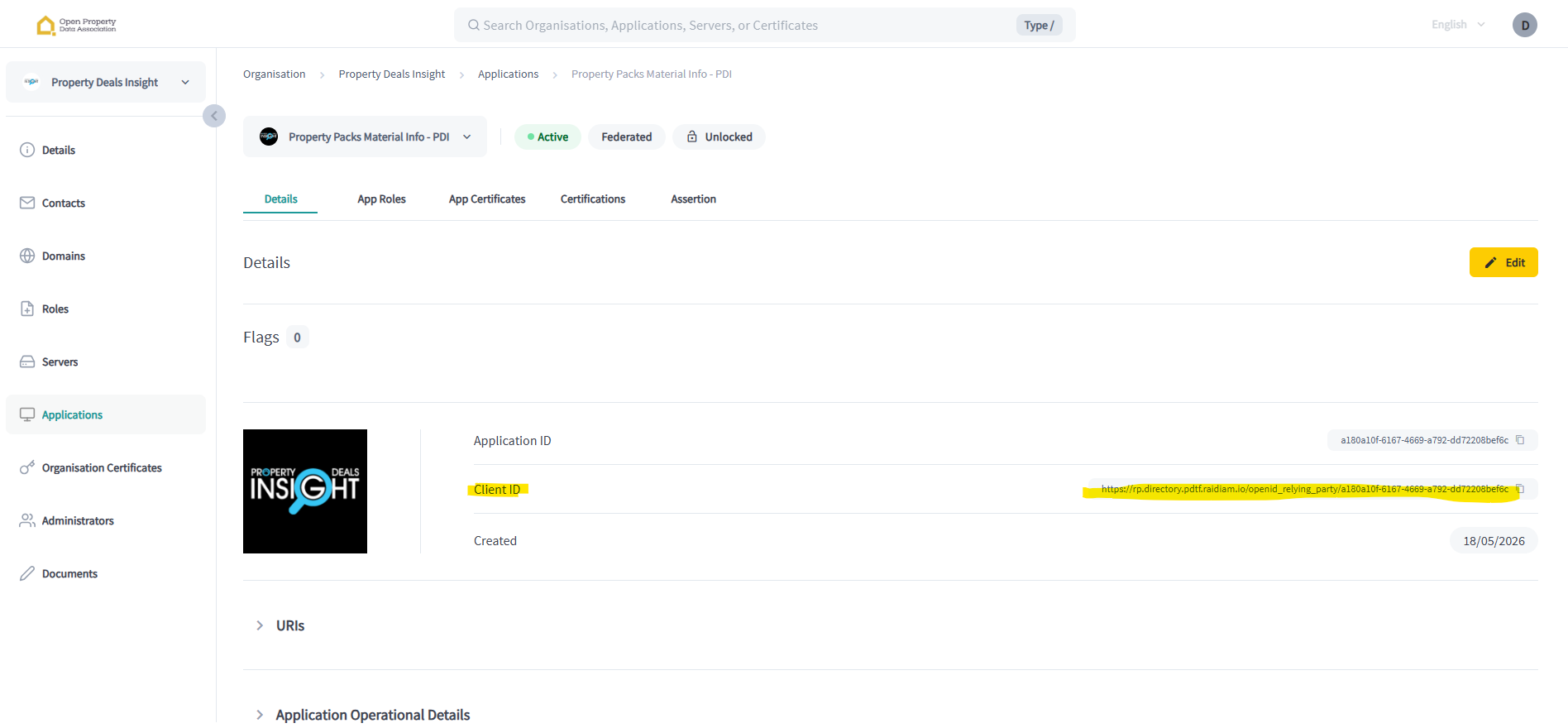
Drop these into your config.py (replace CLIENT_ID with the value shown on your application detail page in the Raidiam directory):
CLIENT_ID = "https://rp.directory.pdtf.raidiam.io/openid_relying_party/<your-app-uuid>"
SCOPES    = "property-pack"
TOKEN_URL = "https://matls-auth.directory.pdtf.raidiam.io/token"property-pack scope on your bearer token. Request it explicitly when you exchange your private_key_jwt at the token endpoint.02API endpoints & what they return
All endpoints below sit under https://sandbox-pdtf.propertydealsinsight.com. Every successful GET response carries a Detached JWS signature in the x-jws-signature header.
/property-pack/interactive/uprn. It gives you machine-readable JSON plus client-ready artefacts (interactive report link and PDF link), so your product can power analytics, advisor workflows and shareable outputs from one API response.A — PDI native (single call, full property pack)
Returns a complete PDTF v3.5.0 Property Pack plus the verifiedClaims[] array in a single response.
Request body
{
  "uprn":           "100021300679",
  "propertyType":   "Terraced",
  "internalAreaSqM": 100,
  "bedrooms":       4,
  "bathrooms":      1,
  "receptions":     2
}uprn, PDI can enrich missing fields (propertyType, internalAreaSqM, bedrooms, bathrooms, receptions) from our address-master where available. It’s still advisable to send the full payload when you have it — richer input gives more accurate appraisals and avoids edge cases where a UPRN can’t be enriched.Curl
curl https://sandbox-pdtf.propertydealsinsight.com/opda-opaque/appraisal/v1/property-pack/uprn \
  --cert path/to/transport.pem --key path/to/transport.key \
  -H "Authorization: Bearer $TOKEN" \
  -H "Content-Type: application/json" \
-d '{"uprn":"100021300679","propertyType":"Terraced","internalAreaSqM":100,"bedrooms":4,"bathrooms":1,"receptions":2}'Recommended for production UX. Same input as above, but the response includes links to a fully-rendered interactive HTML report and a downloadable PDF report for the same property. This is ideal when you want your platform to show live analytics and also hand clients a polished artefact they can open, share and store.
B — OPDA reference spec (sliced)
If your client was written against the OPDA Property-Pack reference spec, call the slice you need. All three GET slices share the same claim IDs so you can stitch them client-side without re-fetching.
Materialised propertyPack only — the latest reconciled view of the property (address, valuation, EPC, council tax, flood risk, planning, utilities, sold history).
The verifiedClaims[] array — each claim signed by PDI with trust_framework: uk_pdtf, evidence and the JSON Pointers it asserts.
A map keyed by JSON Pointer to { source, time, evidenceType, confidence? }. One lookup answers "who said this field, and when?" Reshape of claims.
Add a claim. Accepted and validated against the schema, but not persisted in the sandbox.
Subscribe to changes on a UPRN. Returns a subscription id; no callbacks fire during the hackathon.
Unsubscribe.
GET /current-state/{uprn} — it's the fastest way to see real data flowing. Add claims and provenance-map when you need audit trails.Sample UPRNs
Use any of these UPRNs to explore the sandbox. They cover a mix of property types, locations and data completeness so you can see enrichment in action.
100070482318  100022539219  100071300442  10093560622   100022521703
217048506     100022598809  10090437590   217030257     202065685
100022725034  100022750316  217075263     34095084      100070405179
217018783     10091059238   100022793956  217070918     100071428730
217067551     200015088     100022599518  100070446046  100071271440
217071178     100070385755  217016110     100022802693  100022780345
10033622251   34019425      5009691       100070561271  100022778424
12003281      100022528887  202064990     202219254     5114578
34171489      100022558342  100070565556  100022562980  100022530012
100022540400 200082387 217028345 217126195 516711603Create an application
You provision an application in the Raidiam directory. This binds your organisation to a Client ID, an OAuth flow and your certificates.
-
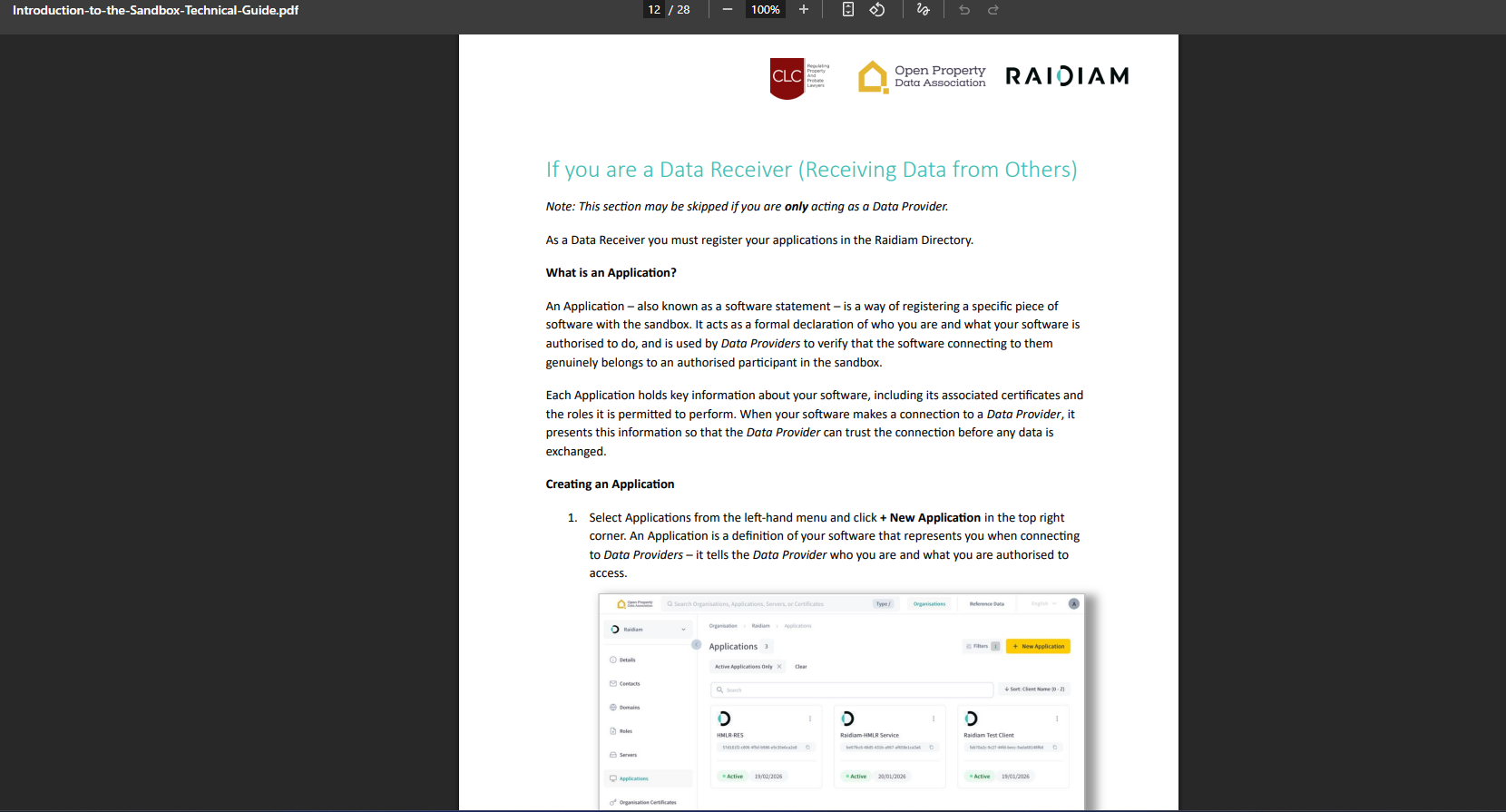
Read the official OPDA sandbox guide. Open the Introduction to the Sandbox Technical Guide — it covers org onboarding and directory roles.
-
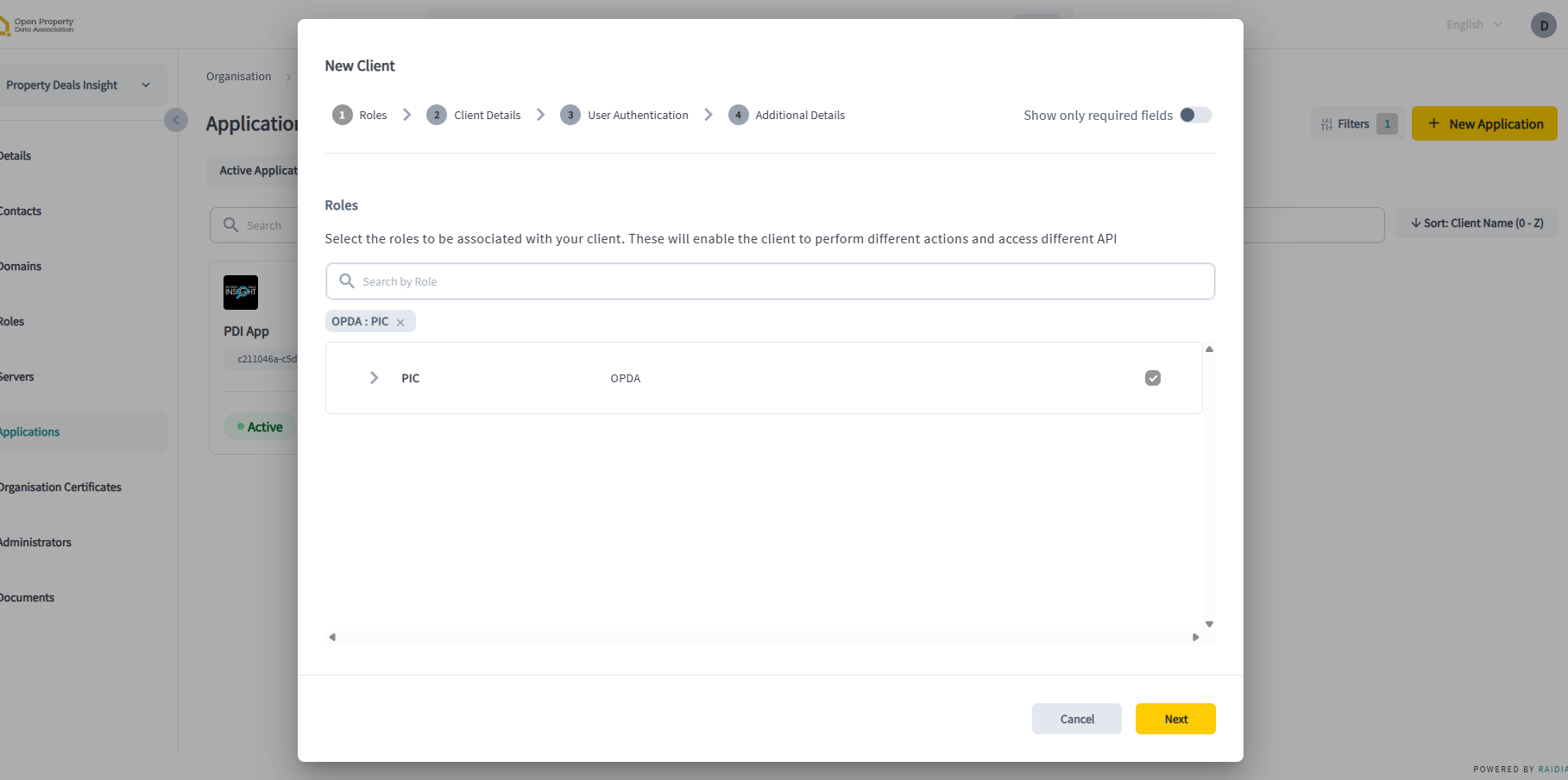
Open Applications → New Application in the Raidiam directory.
-
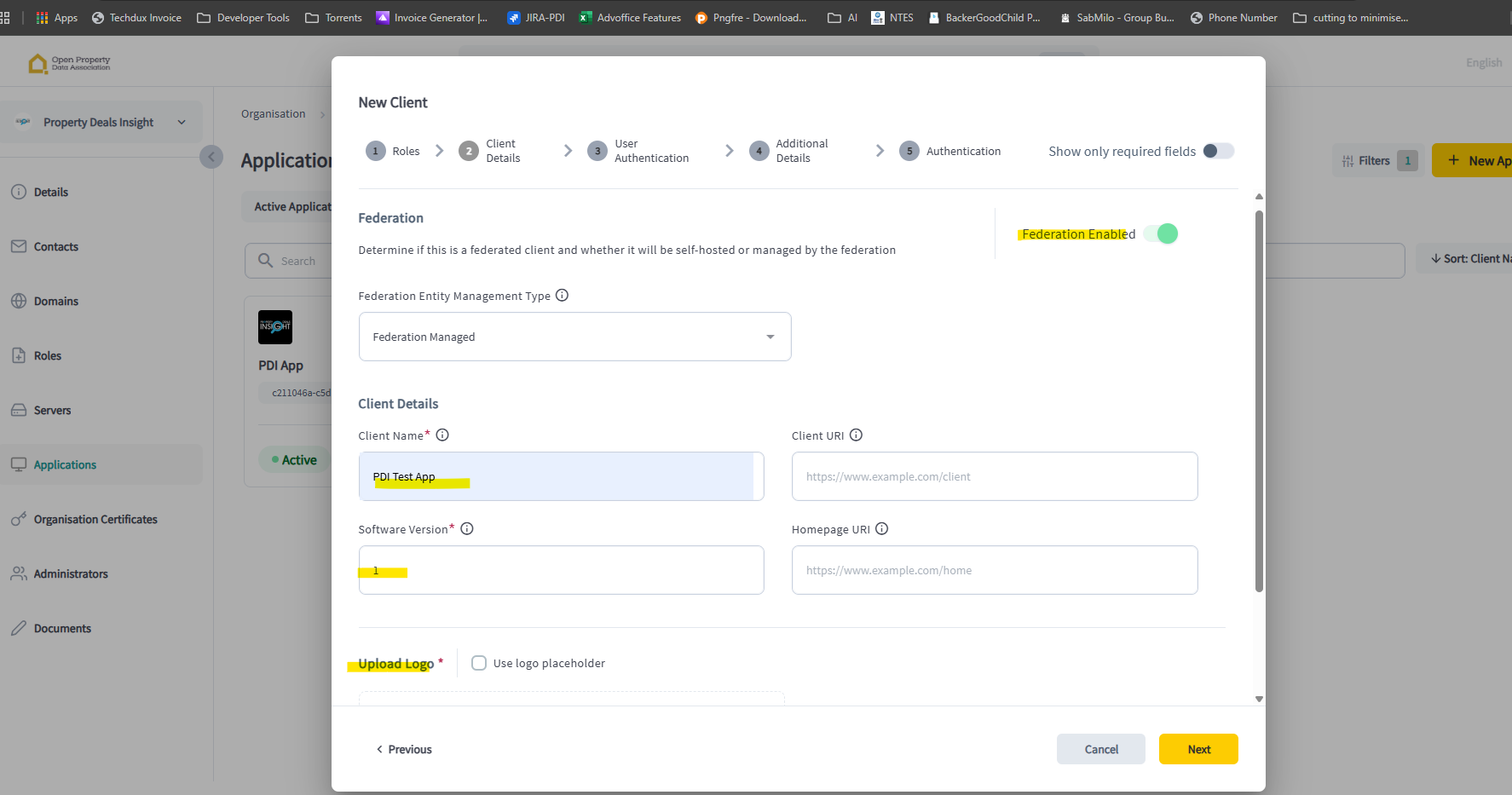
Enable federation, give the application a client name and version, and upload a logo (a placeholder is fine).
-
Set a redirect URL. A placeholder value (e.g.
https://localhost/callback) is enough for sandbox use.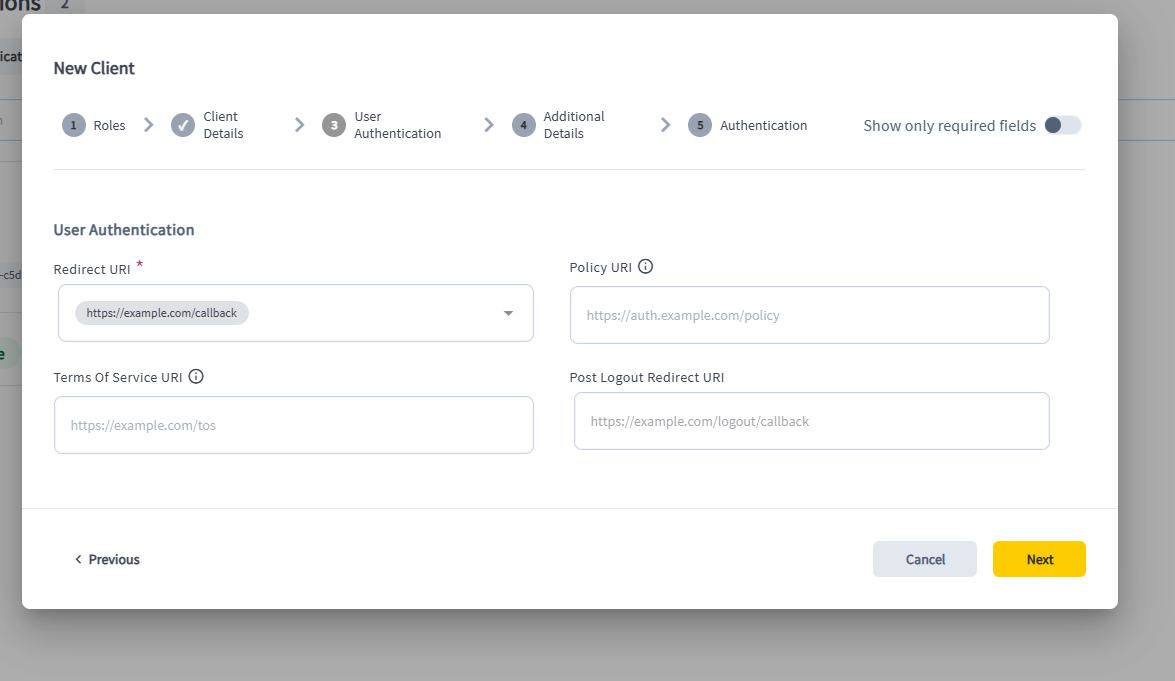
-
Critical final step. Enable Sign Request Object, set the Signed Response Algorithm to
PS256, and set Token Auth Method toprivate_key_jwt. These three settings must match exactly or token issuance will fail.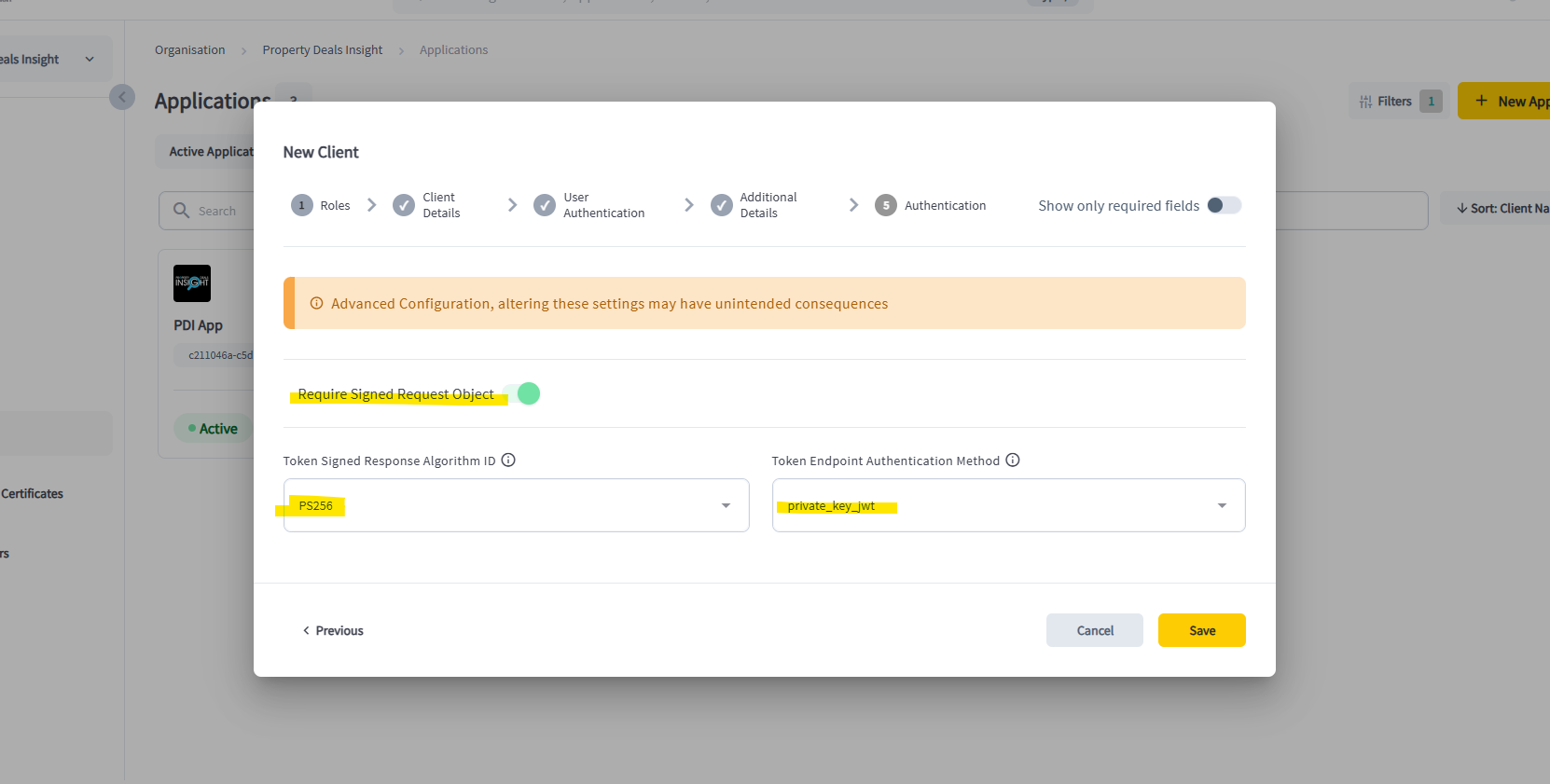 Don't skip.
PS256+private_key_jwt+ Sign Request Object on. Any other combination will return 401 from the token endpoint.
04Create application certificates
You need two certificates per application: a Transport cert (used for mTLS to the PDI data API) and a Signing cert (used to sign the private_key_jwt assertion at the token endpoint).
-
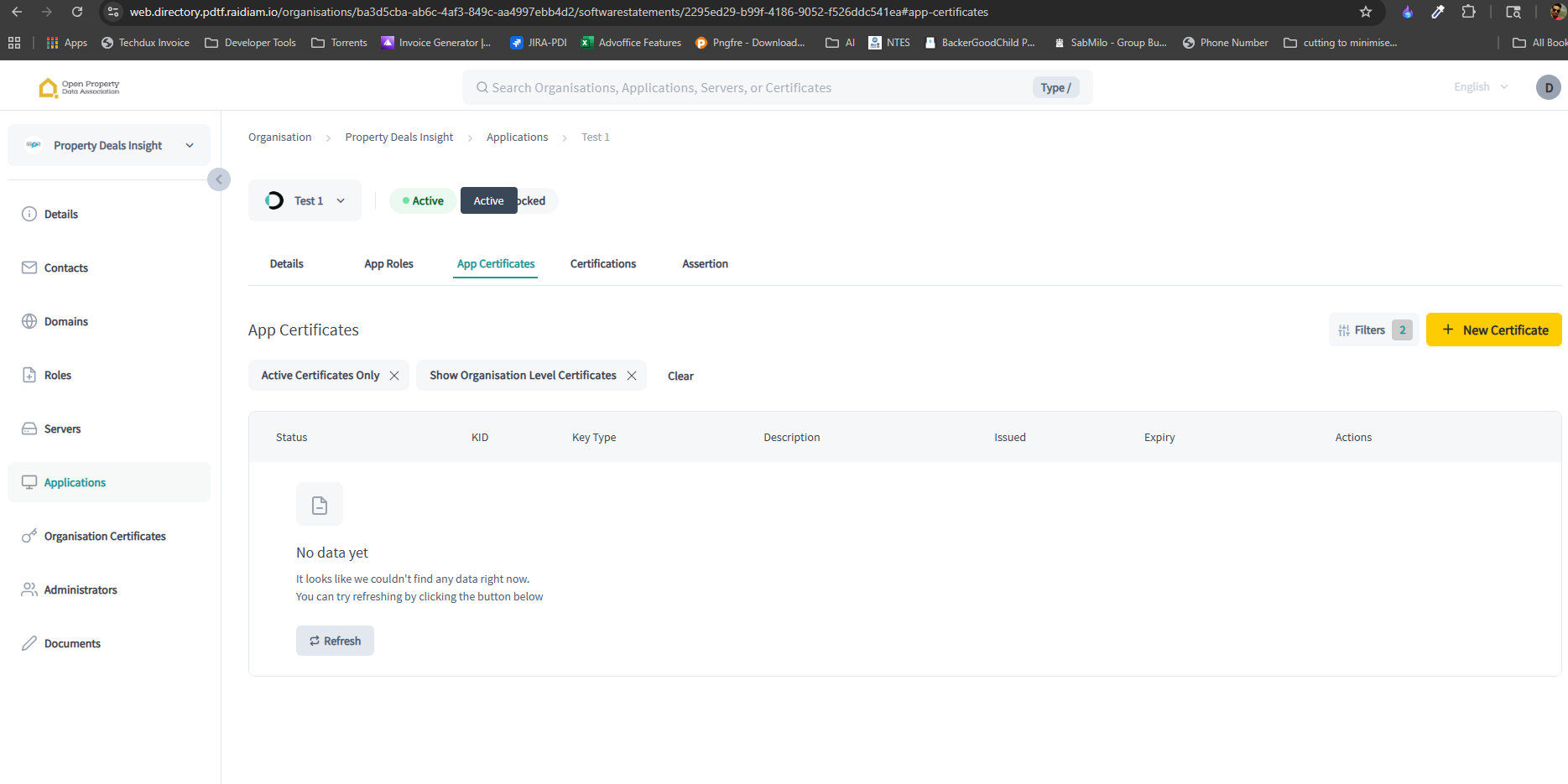
Open your application and go to the App Certificates section.
-
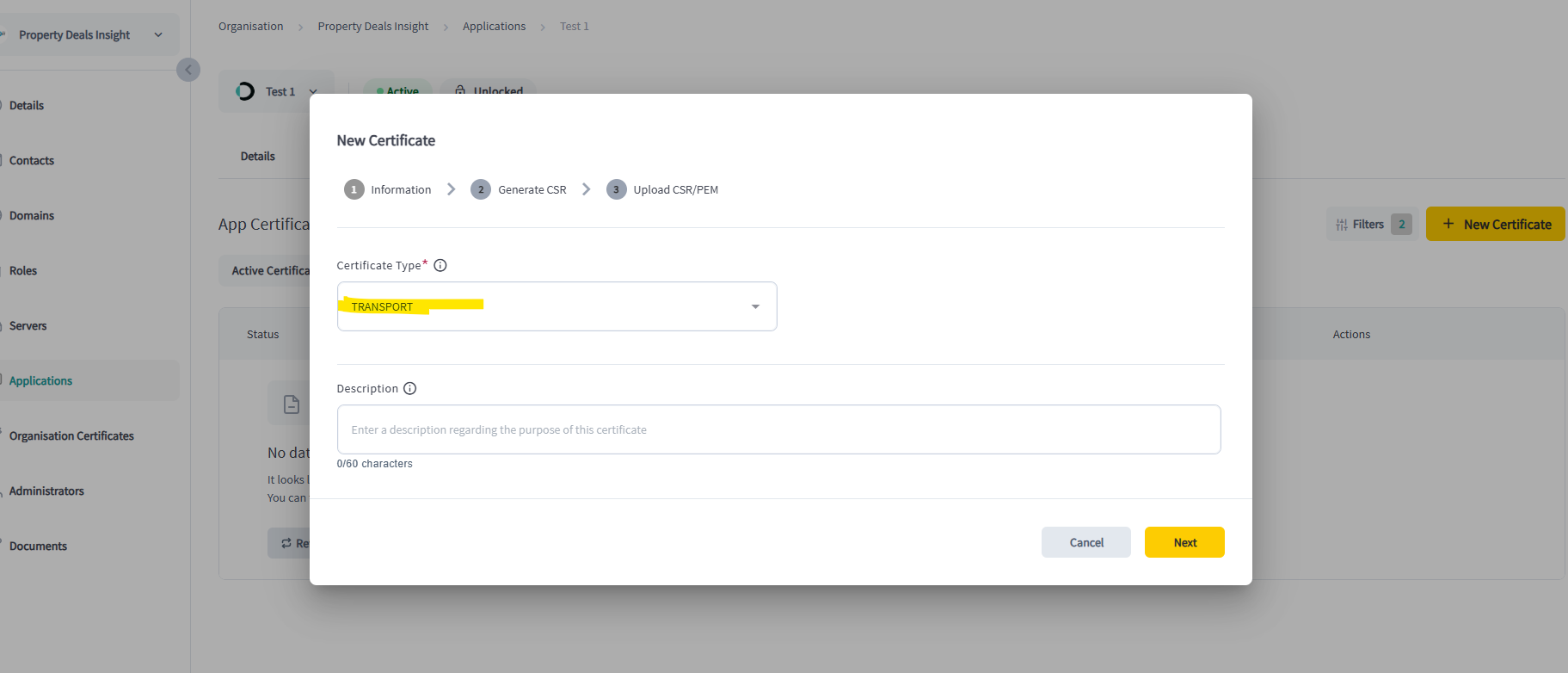
Click New Certificate and choose Transport.
-
Run the
opensslcommand that the directory displays. It generates two files locally: a.key(keep private) and a.csr(upload).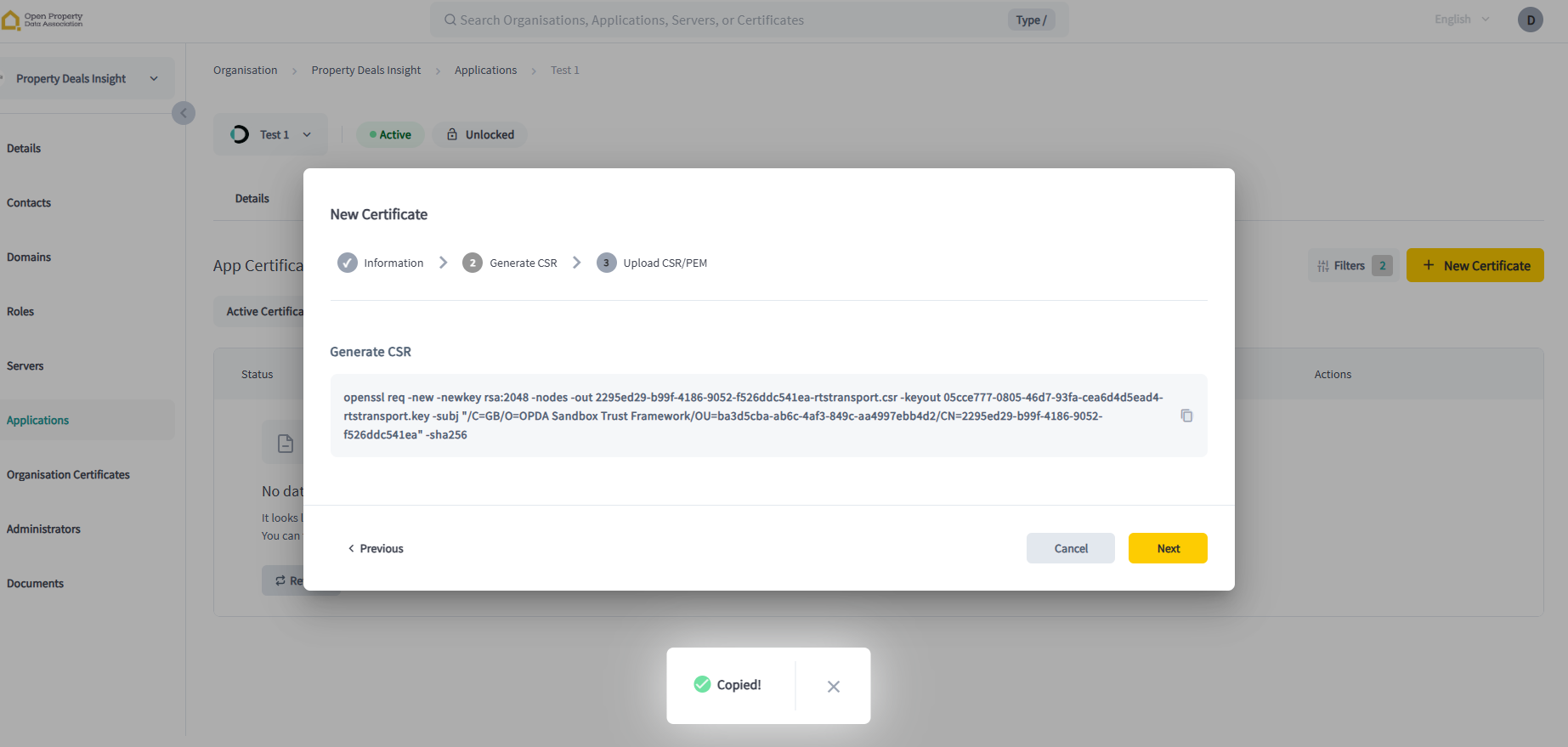
-
Upload the
.csrin the next screen and save.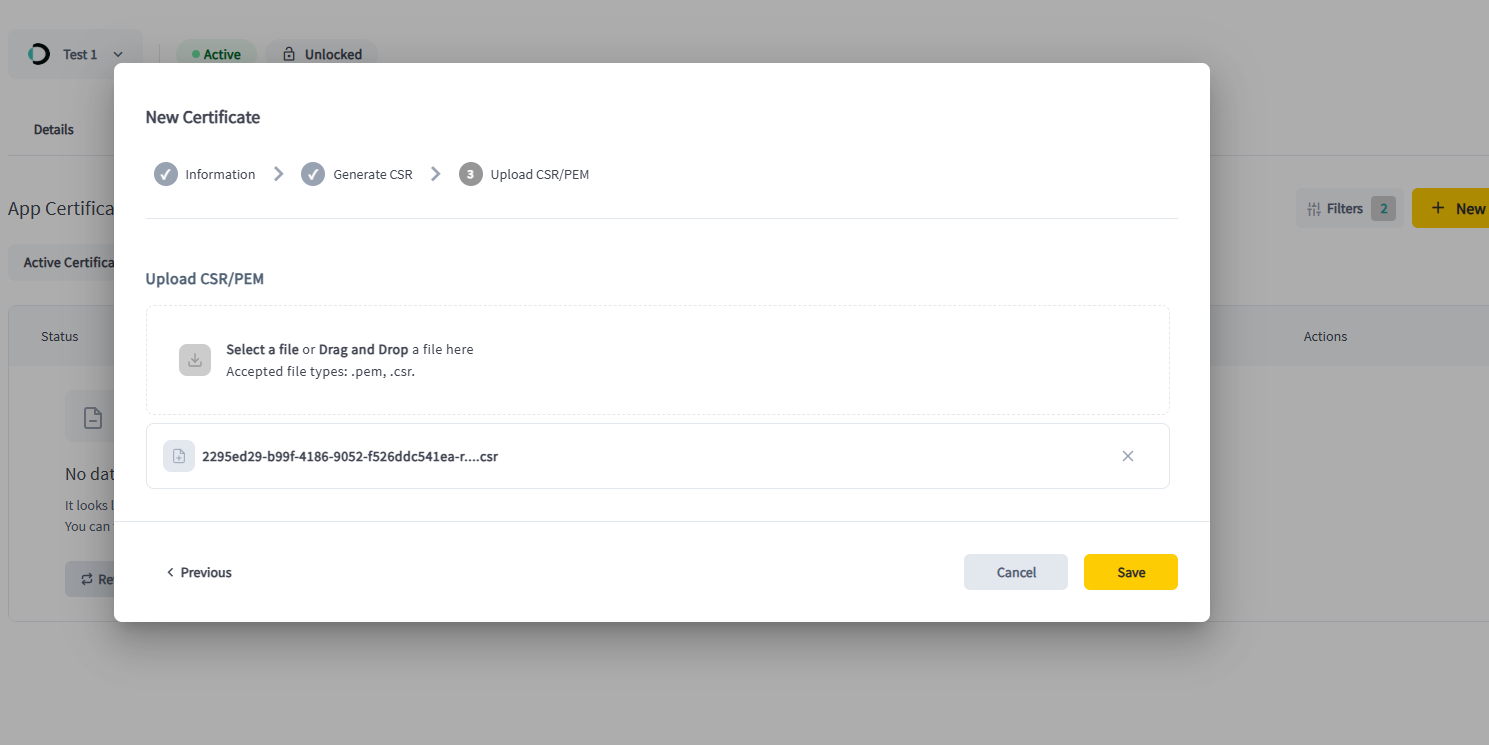
-
Download the issued
.pemfrom the actions menu and store it next to the matching.key.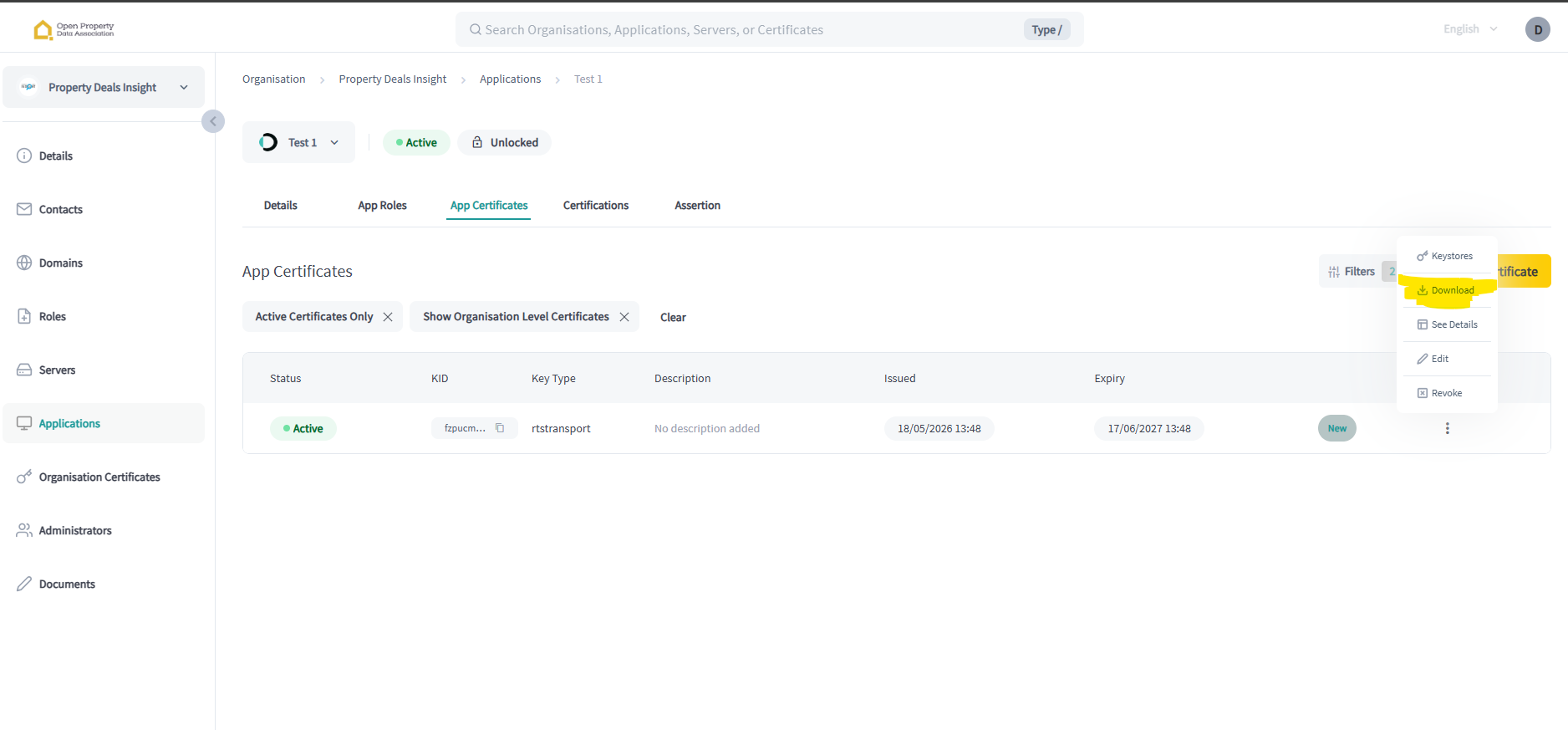
-
Repeat steps 2–5 for a Signing certificate. You should end with two pairs of files — a transport
.key/.pemand a signing.key/.pem.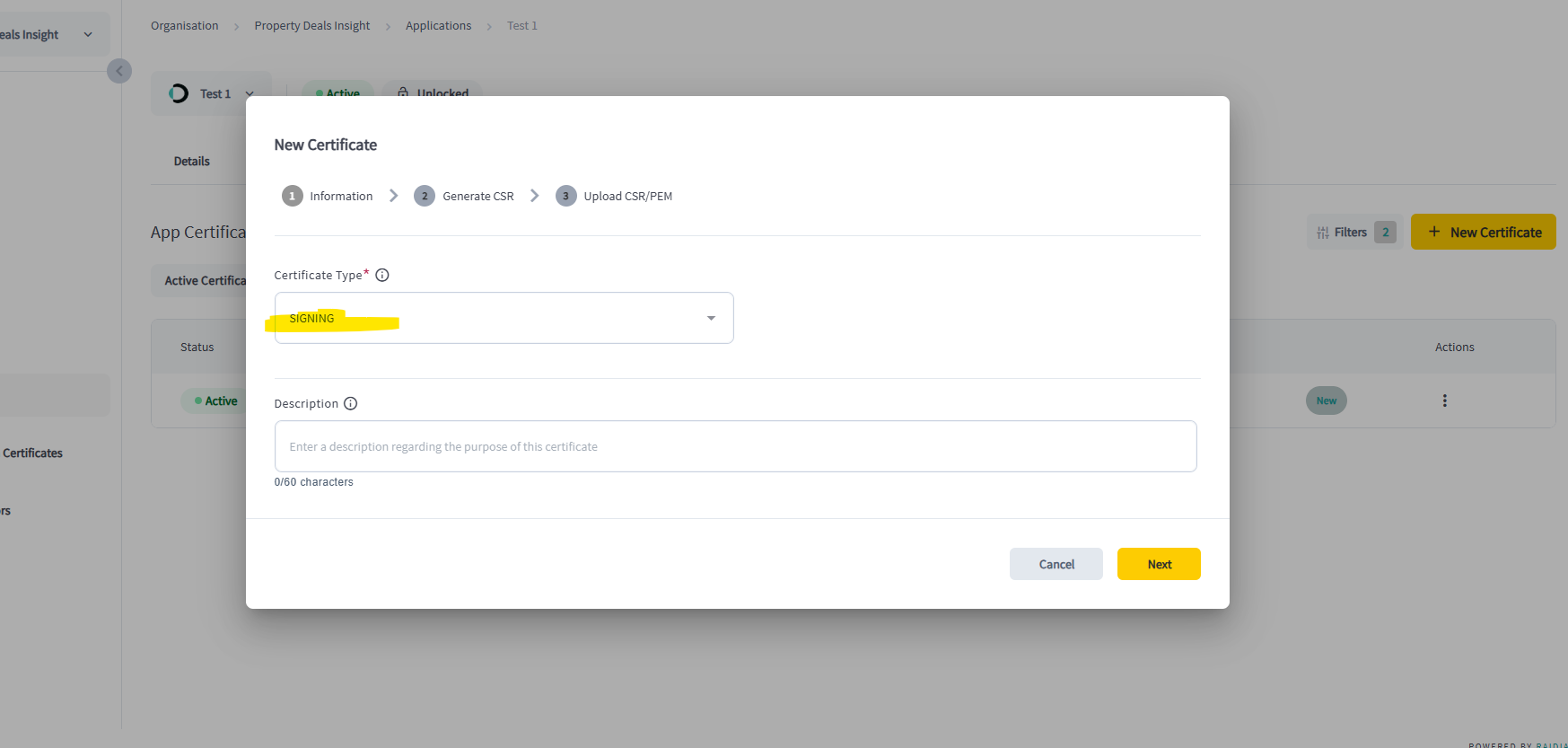
.key files never leave your machine. If a key is lost or leaked, revoke the certificate in the directory and issue a new one.05Run the sample Python script
Our reference client handles the full flow: build a signed private_key_jwt, exchange it for a bearer token at Raidiam, call the PDI Property Pack API over mTLS, verify the Detached JWS, then save interactive/PDF report artefacts when links are returned.
-
Download the sample script bundle. Grab the zip and unpack it somewhere convenient — it contains
access_api_pdi_with_opaque.py,requirements.txtandexample.config.py.# https://developers.propertydealsinsight.com/opda-pdtf/sample_script_to_call_PDI_API_19052026.zip curl -O https://developers.propertydealsinsight.com/opda-pdtf/sample_script_to_call_PDI_API_19052026.zip unzip sample_script_to_call_PDI_API_19052026.zip cd sample_script_to_call_PDI_API_19052026 -
Create a Python virtual environment.
# macOS / Linux / Windows python -m venv env -
Activate the environment.
# macOS / Linux source env/bin/activate # Windows PowerShell .\env\Scripts\Activate.ps1 -
Install dependencies.
pip install -r requirements.txt -
Create
config.pyby copying the contents ofexample.config.py. -
Copy your Client ID from the application detail page in the Raidiam directory into
config.py.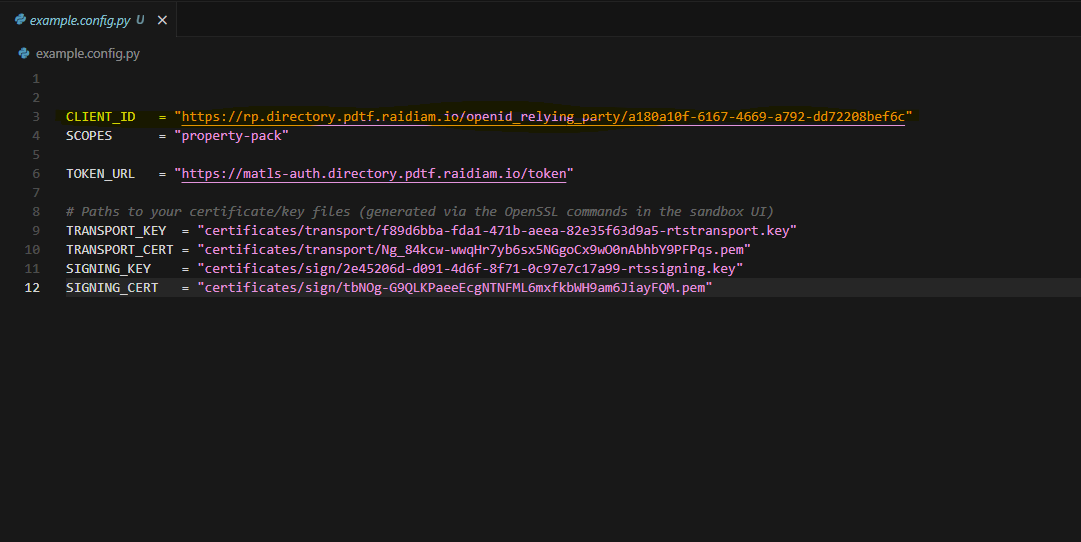
-
Set the certificate paths in
config.pyto point at your transport.pem/.keyand signing.pem/.key. -
Run the script. It exchanges the JWT assertion for a bearer token at Raidiam, then calls the PDI Property Pack API.
python access_api_pdi_with_opaque.pyTo target a specific endpoint and UPRN:
python access_api_pdi_with_opaque.py --endpoint property_pack_uprn             --uprn 100021300679
python access_api_pdi_with_opaque.py --endpoint property_pack_interactive_uprn --uprn 100021300679
python access_api_pdi_with_opaque.py --endpoint current_state                  --uprn 100021300679
python access_api_pdi_with_opaque.py --endpoint claims                         --uprn 100021300679
When you call the
interactivevariant, the script saves any returned interactive HTML and PDF reports under./output/, so your team can immediately review and share client-ready files. -
Tweak the payload. The default request body is set inside the script — swap the UPRN to explore different properties, and keep
downloadPDF: trueenabled when you want PDF links returned by the interactive route.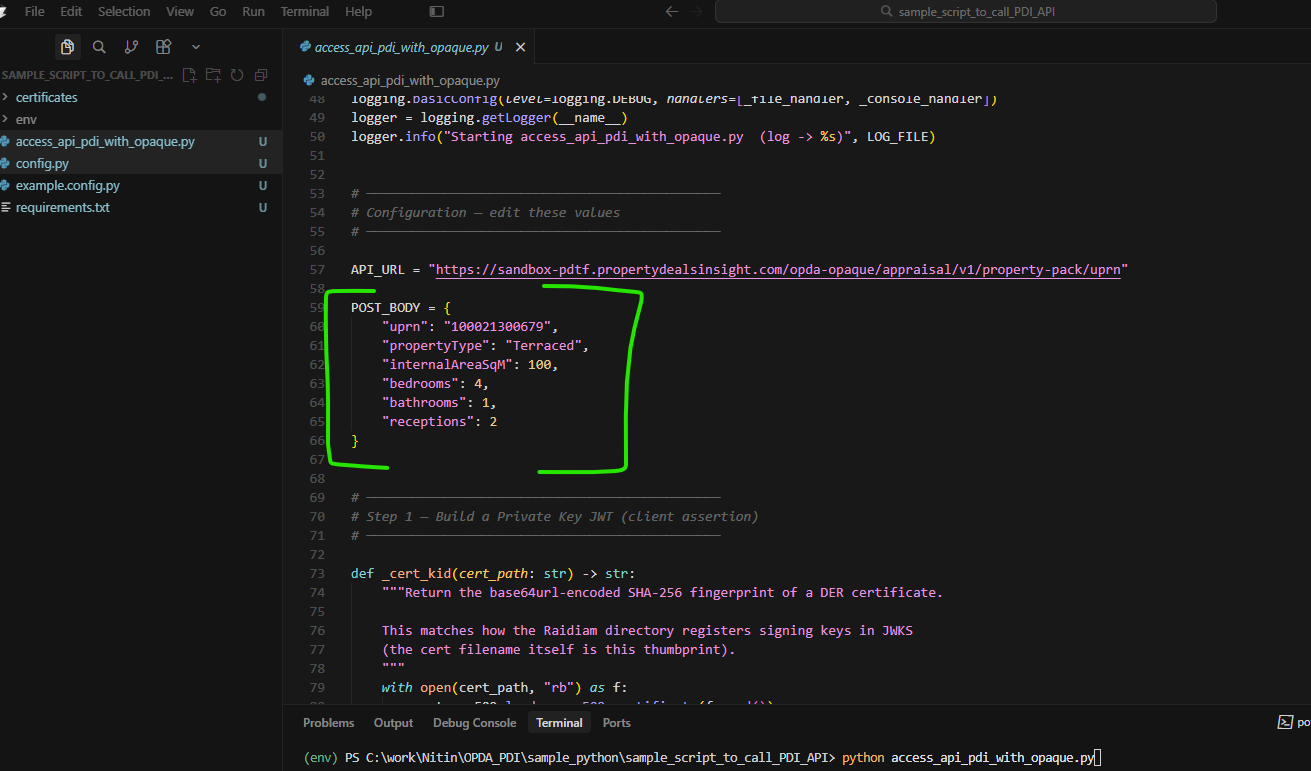
06Sample response
Truncated PDTF v3.5.0 Property Pack. The full schema includes valuation, comparables, EPC, council tax, flood risk, planning, utilities and sold-price history, each wrapped in a signed verifiedClaim.
{
  "transactionId": "9c19e3f1-74a6-4ef4-901f-c444391f2c27",
  "schemaVersion": "3.5.0",
  "propertyPack": {
    "address": {
      "line1": "31 Oaklands, Argyle Road, London",
      "postcode": "W13 0HG",
      "uprn": "12003281"
    },
    "valuation": {
      "avm": 428814,
      "avmConfidence": 0.9,
      "avmRangeLow": 396653,
      "avmRangeHigh": 460975,
      "rentalPcm": 1946,
      "yieldGross": 0.0545
    },
    "energyEfficiency": { "epcRating": "C", "epcEfficiency": "79" },
    "councilTax":      { "band": "D", "localAuthority": "Ealing", "annualCharge": "2138.53" },
    "floodRisk":       { "riverAndSea": "Very low", "surfaceWater": "Low" }
  },
  "verifiedClaims": [
    {
      "id": "60e1b85a-f78e-58b8-8769-a0e4d31414fc",
      "verification": { "trust_framework": "uk_pdtf", "time": "2026-05-18T12:36:56Z" },
      "claims": {
        "/propertyPack/valuation/avm": 428814,
        "/propertyPack/valuation/avmConfidence": 0.9
      }
    }
  ]
}07Limits, errors & support
Sandbox rate limits
- 500 calls per org over 14 days.
- 5 calls per minute per org.
- One UPRN per call.
- Sandbox data only — not for live transactions.
Exceeding a limit returns 429 with a JSON body explaining when to retry.
Want more after the hackathon?
| Path | What you get |
|---|---|
| Stay in the scheme | Once your Raidiam Data Receiver role is fully approved, your token gets onto our sandbox-explorer tier — 100 calls/month, free, forever. |
| Direct commercial | Developer plan with SLAs and higher throughput. Email sales@propertydealsinsight.com. |
Get help
- Raidiam onboarding → paul@openpropdata.org.uk
- Calling the PDI API → support@propertydealsinsight.com
- Source & samples → MIT-licensed Python client in this folder
08Next steps — talk to PDI
When you’re ready to move past the sandbox — whether that’s a live integration, a white-labelled property pack, or a partnership conversation — here are the fastest ways in.
Book a 30-min walkthrough
Live demo on a real UK address: JSON, interactive HTML, PDF, signed claims and how it maps to your workflow.
Book a meeting →Digital Property Packs
Product overview — API, embed widget and white-labelled PDF for agents, conveyancers and lenders. BASPI v5 + PDTF v3.5.0 aligned.
See the product →OPDA & the trust framework
How PDI fits in the Open Property Data Association ecosystem, why PDTF v3.5.0 matters, and who else is in the scheme.
Read about OPDA →Commercial & partnerships
API keys, SLAs, white-label, enterprise data licensing — speak to PDI Team directly.
Email Sales →Try the live product
Sign up for PDI Insight and run property valuations, lead-gen and packs from the UI.
Open PDI Insight →Developer hub
OpenAPI specs, additional endpoints and sample clients across the PDI API surface.
Browse developer docs →